How I Built an AI SQL Agent for 11 Million Records Without Embeddings
An AI SQL agent lets people ask a database questions in plain English. Here is how column-by-column schema design across 38 database columns helped one answer questions over 11 million records—without embedding the rows.
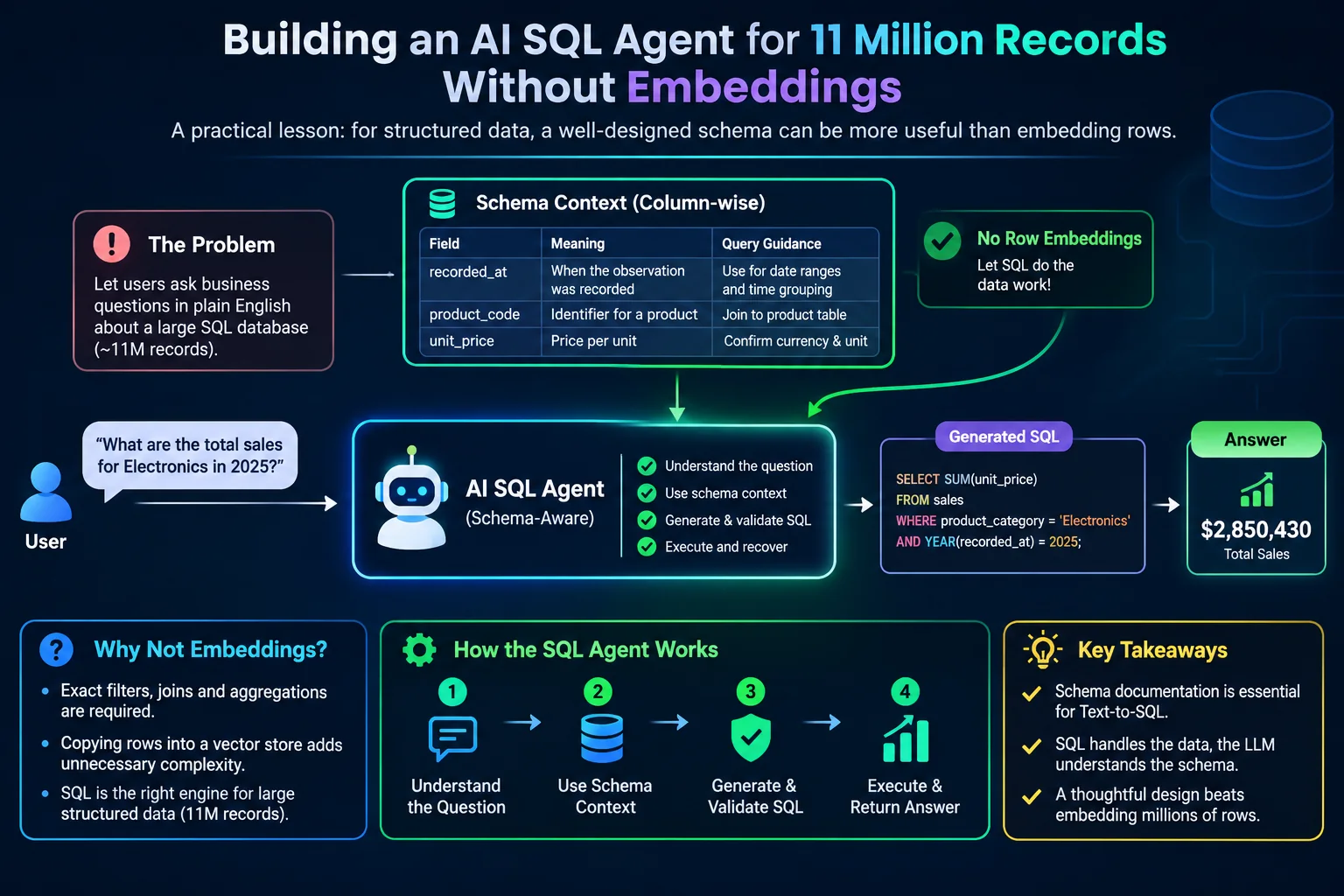
The problem: ask business questions of a large SQL database
I built a conversational SQL agent for a database with around 11 million records. The goal was straightforward for a user: ask a question in plain English and get a useful answer from the database.
The database already had the facts. The hard part was helping the model understand the schema well enough to choose the right tables and columns, interpret business terms, and write a query that could be safely run.
My first important decision was not to embed the database rows. This was a structured-data problem: the source of truth was SQL, and the model needed a precise description of the schema to write queries against it.
Why I didn’t use embeddings for the rows
Embeddings are valuable when you need semantic retrieval over unstructured text. But putting row data into a vector store is not automatically the right answer for a Text-to-SQL agent.
- The agent needed exact filters, joins, counts and aggregations—not approximate matches to similar records.
- Copying structured rows into a second retrieval system adds another data pipeline to maintain.
- Eleven million records is a reason to make the database execute targeted queries, not a reason to send those records to an LLM.
Instead, SQL remained responsible for retrieving and aggregating the records. The model’s job was to translate the question into a safe, relevant query.
Documenting all 38 columns for the SQL agent
The database schema I worked with had 38 columns. Instead of passing the model a list of cryptic field names, I designed schema context for each column so the agent could connect business questions to the fields the database actually stores.
Column-by-column schema design makes the metadata useful to an AI SQL agent: define a column’s business meaning, type, units or format, and query guidance; clarify table relationships and important rules. The examples below are illustrative, not the production schema:
| Database field | Meaning for the agent | Query guidance |
|---|---|---|
recorded_at | When the observation was recorded | Use for date ranges and time-based grouping |
product_code | Identifier for a product | Join to the product reference table; do not treat as a product name |
unit_price | Price per listed unit | Confirm currency and unit before aggregating |
These sample field names and rules are illustrative only; they are not the production schema or its actual column names.
Clear definitions reduce guesswork. They help distinguish an identifier from a label, a timestamp from a reporting period, and a raw value from a value that can be meaningfully summed or averaged.
How the SQL agent works
The agent follows a deliberate workflow rather than asking the model to improvise a database answer in one step:
- Understand the question. Identify the requested entity, measure, filters and time range.
- Use schema context. Match business language to documented tables and columns.
- Generate and validate SQL. Check the query against the schema and enforce read-only access.
- Execute and recover. Run the query, use database errors to guide a correction when needed, and return a clear answer.
The SQL agent workflow was built with LangGraph and served through FastAPI. Keeping the steps explicit made it easier to inspect what the agent was doing and evaluate query quality, latency and cost.
What I learned
“Large database” can mean two different things: a lot of rows, or a complex schema. They need different solutions. A high row count is usually handled by the database engine; a confusing schema is a context and metadata problem.
In this project, documenting all 38 columns gave the SQL agent the schema context it needed to work with 11 million records without embedding the rows. The database remained the source of truth and handled exact filters, joins and aggregations.
This does not mean embeddings are never useful around SQL. They can still help with documentation, user terminology, or unstructured data linked to records. The key is to use them for the retrieval problem they solve—not as a substitute for precise SQL when exact structured queries are required.
AI SQL agent: quick answers
What is an AI SQL agent?
An AI SQL agent takes a plain-English question, uses documented schema context to write a SQL query, validates it, runs it against the database and returns a clear answer.
Do you need embeddings to build a SQL agent?
Not for querying structured rows. In this project the database handled exact filters, joins and aggregations, and column-by-column schema context told the model what each field meant, so the rows were never embedded. Embeddings can still help with documentation, user terminology or unstructured data linked to records.
Can an AI SQL agent work with 11 million records?
Yes. The agent does not read the records. It writes a targeted SQL query and the database engine does the work. Documenting all 38 columns helped the model choose the right fields.
Building a SQL agent?
Start by documenting what every important column means, then test the agent against real questions and validate every query before execution.
Discuss an AI SQL agent project